
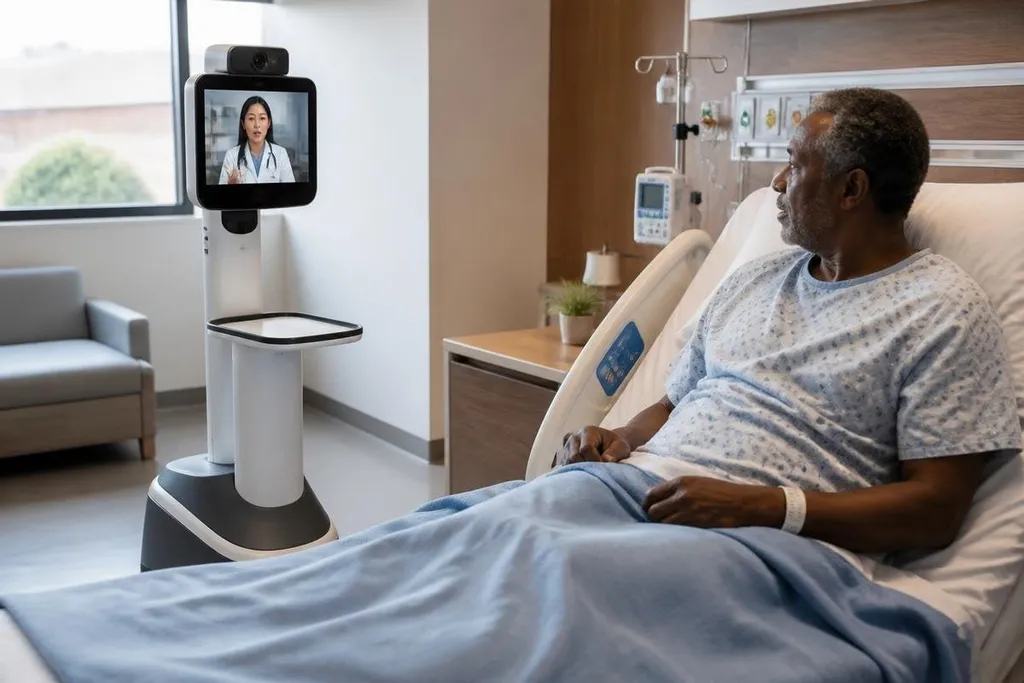
A telemedicine robot can put a remote clinician on a screen that moves through a hospital, clinic, or care home. The machine may carry cameras, microphones, speakers, and a display, while a person controls it from another location.
For a hospital manager, the useful question is not whether a robot can move. It is whether the machine helps a clinician examine, guide, or monitor a patient when being there in person is difficult.
What the robot actually does
Most telemedicine robots work as mobile video links. A remote clinician sees through the robot’s camera, speaks through its speaker, and uses controls to move around a room. Some systems can raise or lower the display so the person on screen sits closer to eye level with the patient.
That setup can help with tasks where sight, sound, and conversation carry much of the work. A specialist could speak with a patient, inspect a monitor, or guide a local nurse through a check. The robot does not replace the nurse in the room. It gives the remote clinician a physical place to look and talk from.
The machine’s movement also changes the call. A fixed tablet shows one view, while a mobile robot can move between rooms or turn toward a patient, monitor, or staff member. That only helps when the robot can move safely around beds, cables, doors, and people.
Quick read
- A telemedicine robot connects a remote clinician to a physical room through video, audio, and movement.
- The useful work is usually remote assessment, guidance, or monitoring rather than physical treatment.
- Hospitals still need local staff, safe movement, secure data, and proof that the system helps care.
Where the machines fit
Remote rounds are a clear use case. A clinician can join a ward visit without walking between rooms, while staff at the bedside handle physical checks and patient care. The robot’s value depends on the quality of that teamwork and the time saved during the visit.
Specialist access is another possible fit. A small clinic may not have a neurologist, intensivist, or wound-care specialist on site. That same system can let the specialist inspect the room and speak with the patient through a local care team.
Care homes may use the same basic setup for visits that need more presence than a phone call. A robot can turn toward the person speaking, show the clinician the room, and let family or care staff join the conversation when the patient agrees.
These uses share one limit: the robot carries information, not hands. It cannot feel a pulse, move a patient, draw blood, or give medicine unless a trained person nearby does that work.
The hard parts are outside the video call
Movement creates safety work. The robot needs a clear route, enough battery for its shift, and controls that make it easy to stop.
A hospital must also decide who moves it, who checks it, and what happens when the network connection drops.
Privacy adds another layer. Cameras and microphones may record health information inside a patient’s room. Access rules, storage settings, account security, and consent need clear owners before the robot enters routine care.
The bedside team matters just as much. A remote clinician may see a patient well on screen but miss a smell, a small change in breathing, or a concern that staff notice in person. Video can widen access, yet it does not give the remote clinician every part of an in-person examination.
For a hospital team weighing remote-care hardware, the useful record ties the robot to a patient task, test setting, and measured result. Robot24.com robotics coverage can help compare those details with the machine’s stated limits before the next section lists the evidence hospitals should ask for.
What proof hospitals should ask for
A sales demonstration can show a robot crossing a room. It does not show whether the system improves care, reduces staff workload, or fits a busy ward. Those questions need records from the setting where the robot will run.
The strongest evidence would connect the machine to a defined task. A hospital could compare visit time, missed assessments, staff workload, patient comfort, and technical failures before and after a trial. The result should also show when staff had to take over.
I’d keep telemedicine robots in narrow roles until that evidence covers the full care process, not only the video feed.
A buying checklist
Before a trial, check these points:
- Name the task: Choose one job, such as remote rounds or specialist review.
- Set the handoff: Write down when a local clinician takes control.
- Test the route: Run the robot near beds, doors, lifts, cables, and visitors.
- Check the link: Measure what happens when video, audio, or network service fails.
- Protect patient data: Set access, recording, storage, and consent rules.
- Measure care: Record time, staff work, patient feedback, and missed sessions.
That last measure decides whether the machine belongs in the workflow. A telemedicine robot earns its place when a named clinical task becomes easier to reach without weakening the care at the bedside; the open question is how many hospitals will publish that proof.